Gigabyte Aorus 1TB NVMe Gen4 SSD Review (2026)
Quick answer
The Gigabyte Aorus 1TB was a strong first-generation PCIe 4.0 SSD in 2019, and it still outperforms any PCIe 3.0 drive in sequential speed today.
Read: 5000 MB/s Write: 4000 MB/s Endurance: 1800 TBW Warranty: 5 years Interface: M.2 4.0 x 4
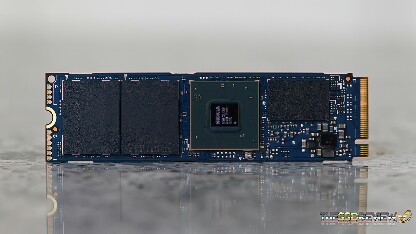
The Gigabyte Aorus 1TB is an early PCIe 4.0 NVMe SSD built on Phison's E16 controller and Toshiba 64L 3D TLC — one of the first Gen4 drives to ship with a bundled heatsink.
Controller & Memory
The Aorus NVMe Gen4 (not to be confused with the later Aorus 7000S) was among the first consumer PCIe 4.0 SSDs to market, launching alongside AMD's X570 platform in mid-2019. It uses the Phison PS5016-E16 controller — a dual-core Arm Cortex-R5 design clocked at 733 MHz with two auxiliary co-processors. This is the predecessor to the E18; it runs slower, uses older 64-layer BiCS3 TLC from Toshiba/Kioxia, and tops out at roughly 5,000 MB/s read.
Gigabyte pairs the E16 with SK Hynix DDR4 DRAM for the flash translation layer. The drive is available in 500 GB, 1TB, and 2TB capacities; at 1TB, the rated sequential speeds are 5,000 MB/s read and 4,000 MB/s write with 750,000 random read and 700,000 random write IOPS. The included heatsink is large and finned, designed to keep the E16 controller from throttling under load. It adds significant height and is removable.
As an early Gen4 drive, the Aorus competes more directly with the Corsair Force MP600 and Sabrent Rocket 4.0 than with newer Phison E18 drives like the Samsung 980 Pro or WD Black SN850. By 2026 standards, the E16 platform is a generation behind — but it still outperforms any PCIe 3.0 drive in sequential throughput.
Storage Comparisons:
Aorus Performance & Benchmarks
Gigabyte rates the Aorus 1TB at 5,000 MB/s sequential read and 4,000 MB/s sequential write. Independent reviews from The PC Enthusiast and ThinkComputers confirm these numbers are achievable in CrystalDiskMark on a fresh drive. The E16 controller is the first-generation Phison PCIe 4.0 design, and its random performance — 750K read and 700K write IOPS — is strong for its era but trails the later E18 generation.
Gigabyte Aorus 1 TB vs M.2 4.0 x 4 peers
Switch between sequential throughput and random IOPS to see how this drive stacks up against other M.2 4.0 x 4 SSDs in our database. The highlighted bar is the drive on this page — click any other bar to open that drive.
- Patriot Viper PV593 1 TB: 14,500 MB/s read, 14,000 MB/s write
- Patriot Viper PV593 2 TB: 14,500 MB/s read, 14,000 MB/s write
- Patriot Viper PV593 4 TB: 14,500 MB/s read, 14,000 MB/s write
- Patriot Viper PV573 2 TB: 14,000 MB/s read, 12,000 MB/s write
- Gigabyte Aorus 1 TB (this drive): 5,000 MB/s read, 4,000 MB/s write
In real-world workloads, the Aorus shows a typical Phison SLC cache pattern: burst writes hit the rated speed for the first several hundred gigabytes, then settle to around 1,500 MB/s once the cache fills. 4K random performance is competitive with other E16 drives like the Corsair MP600 but meaningfully slower than PCIe 4.0 drives on the E18 or Samsung Elpis controllers. Game load times, OS boot, and application launches are essentially identical to other Gen4 drives at the same capacity — the difference only shows up in sustained writes and heavy queue-depth workloads.
Gigabyte Aorus vs Competitors
See how the Aorus stacks up against other M.2 4.0 x 4 drives in our database:
Compare with rival drives:
Endurance, TBW & Warranty
The Aorus 1TB carries a 1,800 TBW endurance rating, which is notably higher than the 700 TBW on its successor (the Aorus 7000S 1TB). This reflects the older 64-layer BiCS3 flash, which is rated for more write cycles than the faster 96-layer Micron TLC used in the E18 generation. The drive is covered by a 5-year limited warranty. At 50 GB of writes per day, the 1,800 TBW rating translates to roughly 99 years of use — effectively unlimited for any consumer. The MTBF is rated at 1.7 million hours. The drive includes AES-256 hardware encryption support.
Gigabyte Aorus 1 TB Specifications
| Category | Value |
|---|---|
| Capacity [?] | 1 TB |
| Interface [?] | M.2 4.0 x 4 |
| Controller [?] | Phison PS5016-E16 |
| Memory type [?] | Toshiba 3D TLC |
| DRAM [?] | SK Hynix 2GB DDR4 |
| Read speed (MB/s) [?] | 5000 |
| Write speed (MB/s) [?] | 4000 |
| Read IOPS [?] | 750000 |
| Write IOPS [?] | 700000 |
| Endurance (TBW) [?] | 1800 |
| MTBF (million hours) [?] | 1.7 |
| Warranty (years) [?] | 5 |
Verdict: Is the Aorus Worth It in 2026?
The Gigabyte Aorus 1TB was a strong first-generation PCIe 4.0 SSD in 2019, and it still outperforms any PCIe 3.0 drive in sequential speed today. However, the Phison E16 platform has been surpassed by the E18 generation and Samsung's Elpis controller, both of which deliver higher write speeds, better random IOPS, and improved power efficiency. For builders who already own this drive, there is no urgent reason to upgrade — but new buyers should look at the Aorus 7000S, Samsung 980 Pro, or WD Black SN850 for a modern Gen4 experience at a similar or lower price point.
+ Pros
- 5,000 MB/s sequential read on PCIe 4.0
- 1,800 TBW endurance exceeds newer E18 drives
- Included finned heatsink prevents throttling
- AES-256 hardware encryption
- 5-year warranty
- Cons
- E16 controller is a generation behind E18
- 4,000 MB/s write trails newer Gen4 drives
- Large heatsink limits motherboard compatibility
- 64-layer TLC is slower than modern 96-layer NAND
Buy this or similar SSD Storage:



Video Review
AORUS AIC NVME SSD Review (1TB) - Now with RGB....