What Is SSD Capacity? GB vs TB Explained
SSD capacity is the amount of data a solid-state drive can hold. It is usually listed in gigabytes (GB) or terabytes (TB), and it directly affects how many games, apps, videos, and project files you can keep on the drive.
Common SSD capacity sizes
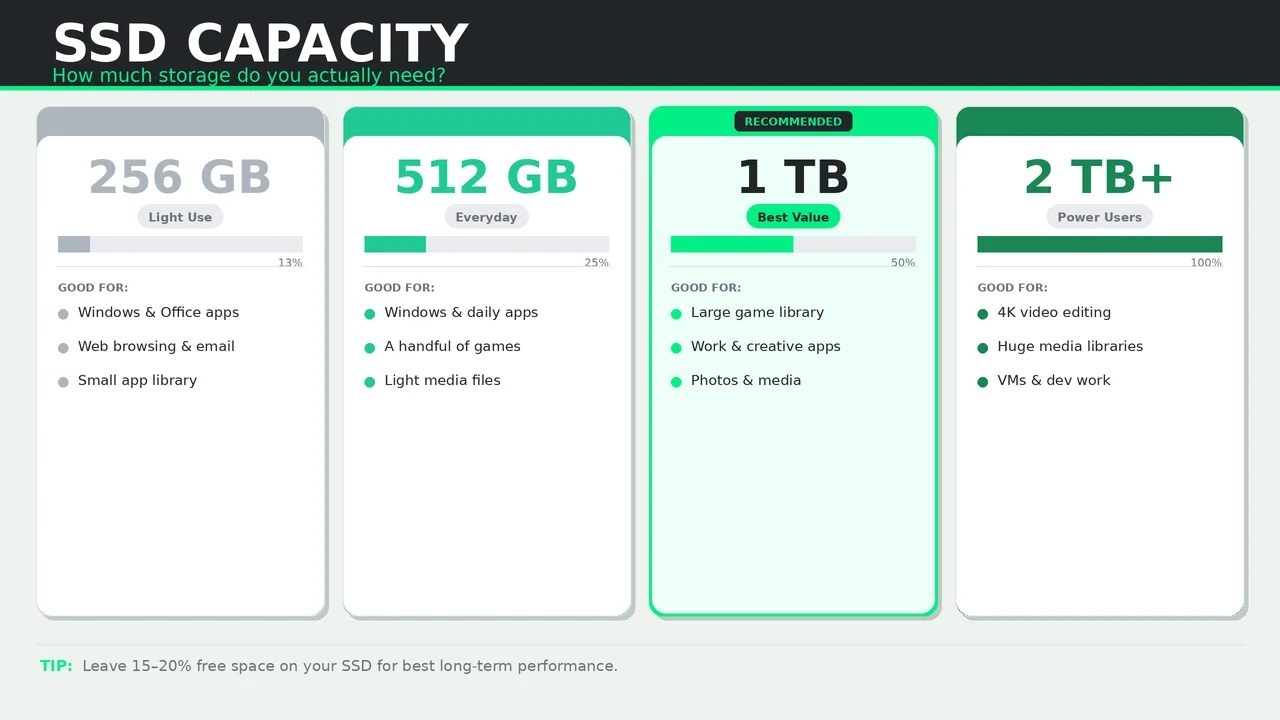
- 250 GB to 256 GB — enough for Windows, office apps, and a small number of games.
- 500 GB to 512 GB — a practical minimum for most people buying a primary SSD today.
- 1 TB — the best balance of price, capacity, and flexibility for gaming and work PCs.
- 2 TB and above — ideal for large game libraries, 4K video, content creation, and heavy local storage.
GB vs TB: what is the difference?
- 1 TB equals 1,024 GB in the way storage is commonly described.
- A 1 TB drive gives you much more breathing room once you install modern games, Adobe apps, or large media files.
- Real usable space is always a bit lower after formatting and system partitions.
How much SSD capacity do you need?
For everyday use
A 500 GB SSD is usually enough for web browsing, office work, school tasks, and a normal app setup.
For gaming
Start at 1 TB if you install several modern games. Many current titles can use 80 GB to 150 GB each, so smaller drives fill up fast.
For creators and professionals
Choose 2 TB or more if you work with RAW photos, 4K video, large sample libraries, or virtual machines.
Does a bigger SSD perform better?
Often, yes. Higher-capacity SSDs can deliver better sustained performance and higher endurance because they usually have more NAND dies to work with. That does not mean every 2 TB drive is faster than every 1 TB drive, but capacity can help.
Buying advice
- Leave at least 10 to 20 percent free space for better long-term performance.
- If the SSD is your only drive, avoid going too small just to save a little money.
- If you are choosing between 500 GB and 1 TB, the 1 TB model is usually the better long-term buy.