What Is SSD IOPS and How Much Do You Need?
Posted on
by
Raymond Chen
IOPS measures how many individual read or write operations an SSD can perform per second. It matters most for random access patterns such as booting, launching apps, and multitasking.
What is IOPS?
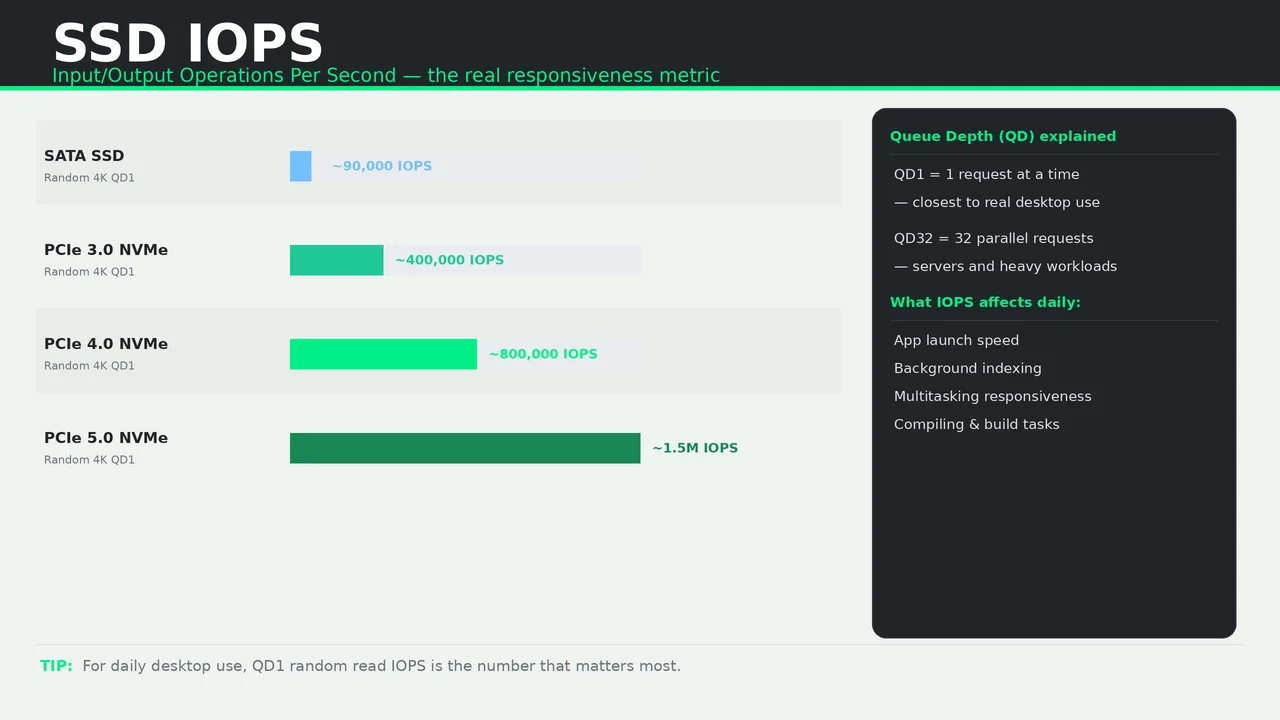
IOPS stands for Input/Output Operations Per Second. It measures random 4K performance at different queue depths (QD).
- QD1 — one request at a time. Closest to real desktop use.
- QD32 — 32 parallel requests. Relevant for servers and heavy workloads.
For most home users, QD1 random read IOPS is the number that matters most.
Typical IOPS by drive type
- Hard drive — around 100 to 200 IOPS
- SATA SSD — around 80,000 to 100,000 IOPS
- PCIe 3.0 NVMe — around 300,000 to 500,000 IOPS
- PCIe 4.0 NVMe — around 600,000 to 800,000 IOPS
- PCIe 5.0 NVMe — can exceed 1,000,000 IOPS
Does higher IOPS feel faster?
In everyday use, once you are on an SSD, going from SATA to faster NVMe IOPS can feel subtle. The biggest jump is from HDD to SSD. After that, differences exist but are less noticeable outside of specific tasks such as compiling, databases, or heavy multitasking.
What affects IOPS in real use?
- Drive interface and protocol
- Controller quality
- NAND type and configuration
- DRAM cache presence
- Firmware optimization
Buying advice
- Any SSD is a huge IOPS upgrade over any hard drive.
- For daily desktop use, do not pay a large premium just for higher IOPS numbers.
- Check real-world benchmarks if you run specific workloads such as databases or compiling.